You park your car dozens of times a month. At metered spots, time-limited free zones, parking garages, airport lots, hospital decks, street parking with a 2-hour limit. Some cost money. Some don't. Almost all of them disappear from memory within minutes — the cost, the location, sometimes even the floor you parked on.
CarExpenses is a car expense tracker app that includes a full parking tracker — handling the three things every driver needs at a parking spot: remember where the car is (no more "where did I park?" moments), know how much time is left, and log the cost without extra work. It works for paid and free parking, timed and untimed, across every vehicle in your account.
Start a parking session in one tap
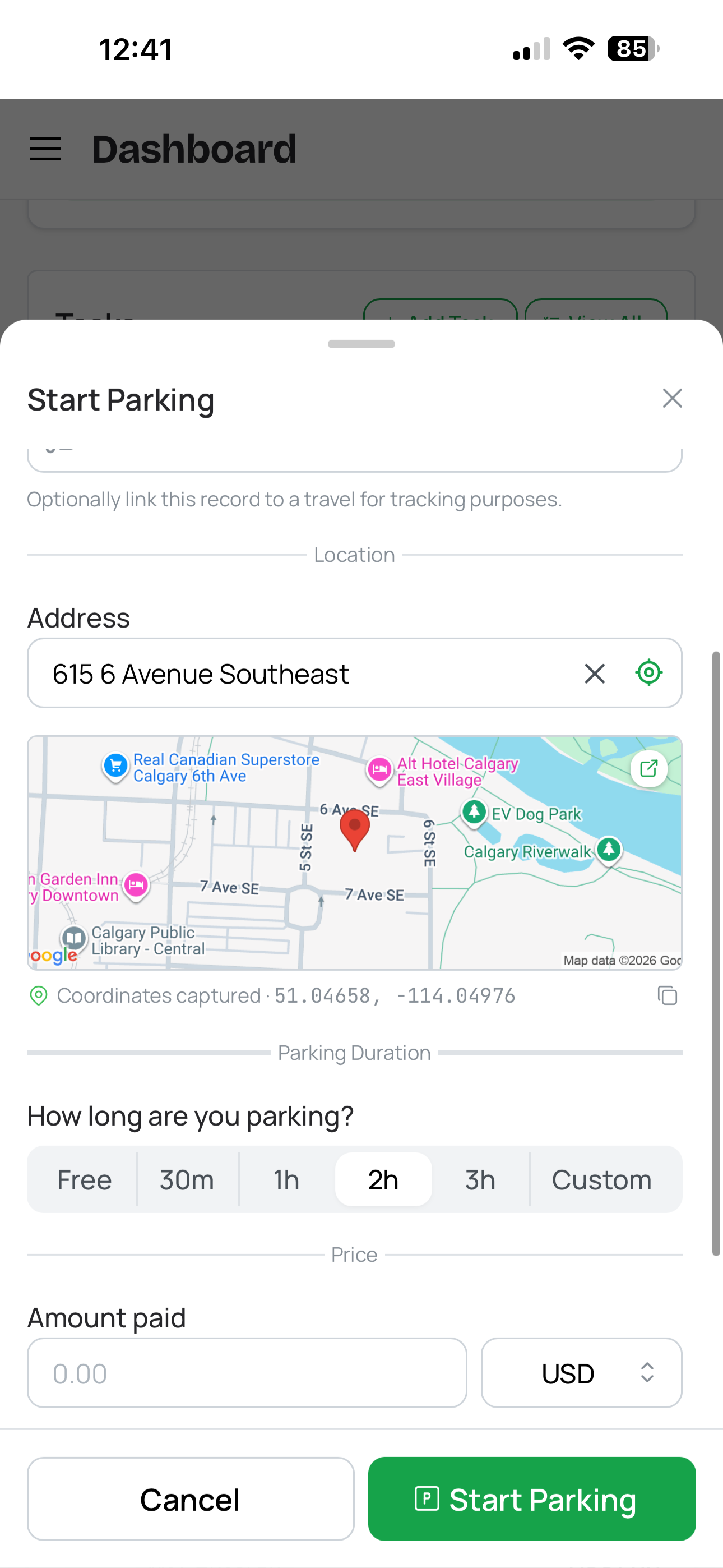
Start parking session
Tap the parking button on your vehicle card, and the app does the rest. It requests your device's GPS location, drops a pin on the map, and reverse-geocodes the address — all before you've locked your car. If GPS isn't available or isn't accurate enough (parking garages, underground lots), type in the address manually or add a note like "Level 3, spot B12, next to the blue pillar."
Set a parking duration if your spot has a time limit — whether it's a paid meter or a free zone with a 2-hour maximum. Quick presets let you pick 30 minutes, 1 hour, 2 hours, or 3 hours with a single tap, or enter a custom duration. Optionally enter the price you paid. If you're not sure yet, skip it — you can add the final amount when you end the session.
The start time defaults to right now but is fully editable, so if you walked a block before opening the app, you can backdate by a few minutes.
Never miss a parking meter expiry again
Once a session is active, a persistent banner appears across every page of the app — a built-in parking timer and parking meter reminder app that follows you everywhere. What it shows depends on your session type:
Timed parking (paid or free with a time limit): A live countdown of minutes and hours remaining. When you're down to the last 10 minutes, the banner shifts to a warning state. Once time expires, it flips to show how long you've been over — so you can decide whether to rush back or accept the overtime.
Untimed parking (no duration set): A running clock showing how long you've been parked. Useful when you want to keep track of time without a hard deadline.
If you feed the meter or otherwise extend your parking, tap the banner to open the session details and hit "Add Time." Choose a quick preset (+15 min, +30 min, +1 hour) or enter a custom amount. This updates your session's total duration so the countdown stays accurate. CarExpenses doesn't connect to any external parking meters or payment services — this is your personal record of how much time you have left.
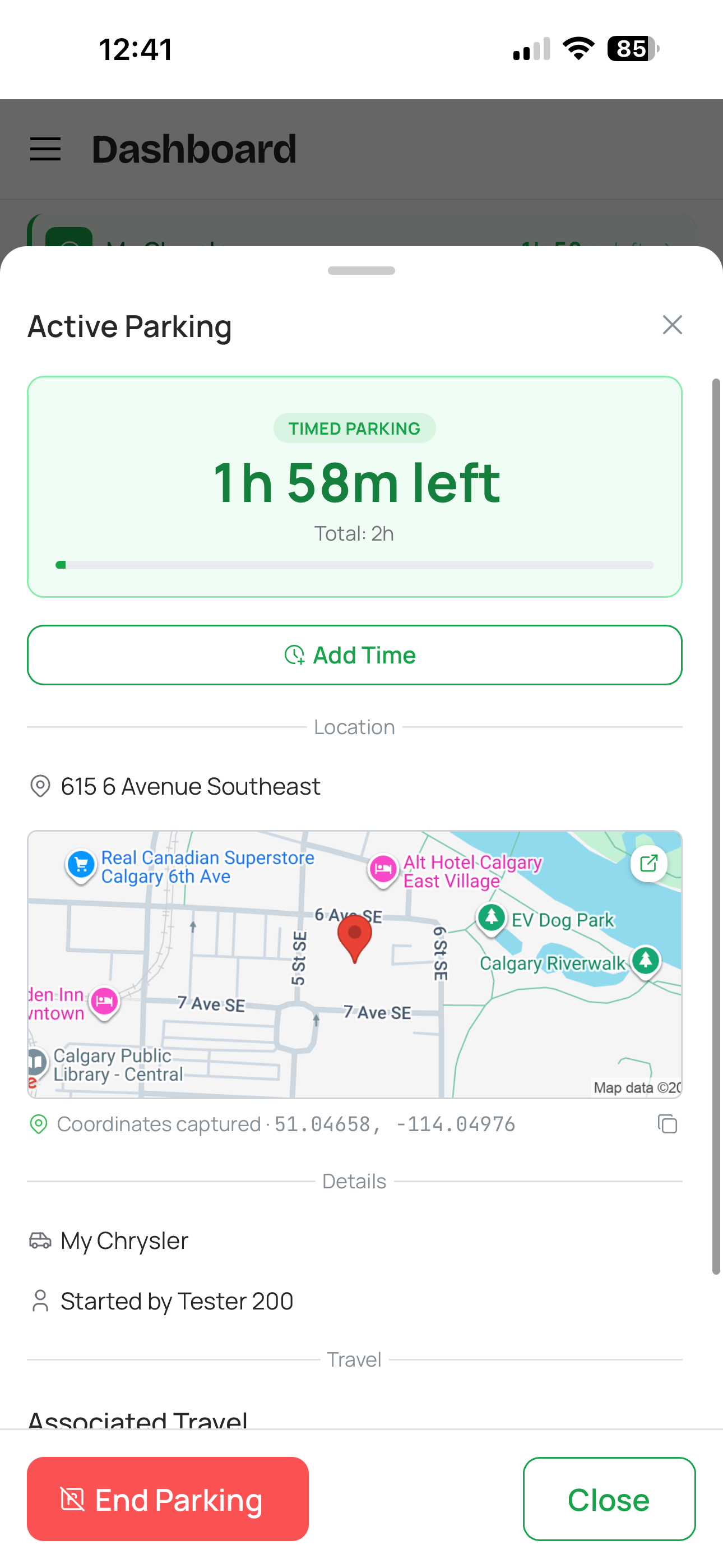
Active parking session
Find your parked car with walking directions
Can't remember where you parked? Every parking session saves your car's exact GPS coordinates and address. If you've ever searched "find my parked car" on your phone, CarExpenses eliminates that problem entirely. Tap the map from the active session detail view to open Google Maps with walking directions from your current location straight to your vehicle. No more wandering parking garages, circling airport lots, or trying to remember which side street you chose.
This works for every session — paid or free, timed or untimed. Even if you're just using CarExpenses as a parking spot saver at a shopping mall or event venue, the directions feature is always one tap away.
Track parking expenses automatically — no double entry
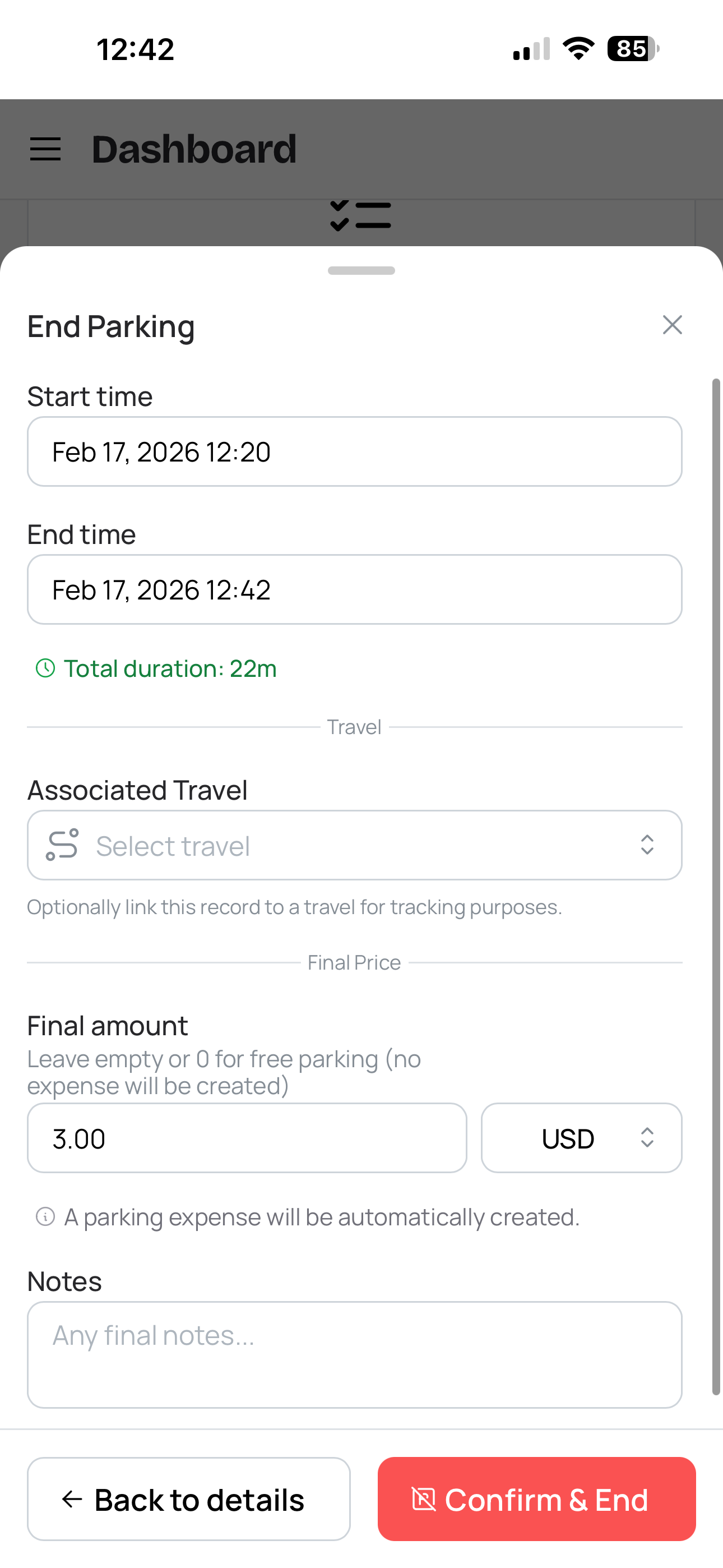
End parking session
When you end a parking session and enter a final price, CarExpenses automatically generates a parking expense linked to the session. The expense inherits everything from the session — vehicle, date, amount, currency, location, GPS coordinates, and your notes — so there's nothing to re-type. Think of it as a parking receipt tracker that creates its own receipts.
Here's how ending a session works:
- Review times — Start and end times are pre-filled and editable. The total duration is calculated automatically.
- Enter the final price — Pre-filled if you entered a price at the start. Adjust it to the actual amount, or leave it at zero for free parking.
- Add notes — Carried over from the session, editable. Add anything you want on the record.
- Confirm and close — The session is marked as completed. If the price is greater than zero, a parking expense appears in your expense list instantly.
If parking was free, no expense is created. The session is saved to your history as a completed free parking record — useful for tracking how often you park at certain locations even when it doesn't cost anything.
Full parking history with parking spend and duration stats
Every parking session — active, completed, paid, or free — is stored in a dedicated parking history page. Filter by vehicle and date range, and see parking analytics at the top: total sessions, total spent, average cost per session, total time parked, average duration, and your most-visited parking location. Finally, an answer to "how much do I spend on parking?" — broken down by vehicle, not just a guess.
Sessions are grouped with active sessions pinned to the top and completed sessions below. Each card shows the date, location, duration, and cost at a glance. Tap any session to view full details or edit it.
Need to log parking from last week that you forgot to track in real time? Create a past parking session manually — enter the vehicle, start and end times, location, and price, and the app handles everything exactly as if you'd tracked it live, including generating the linked expense.
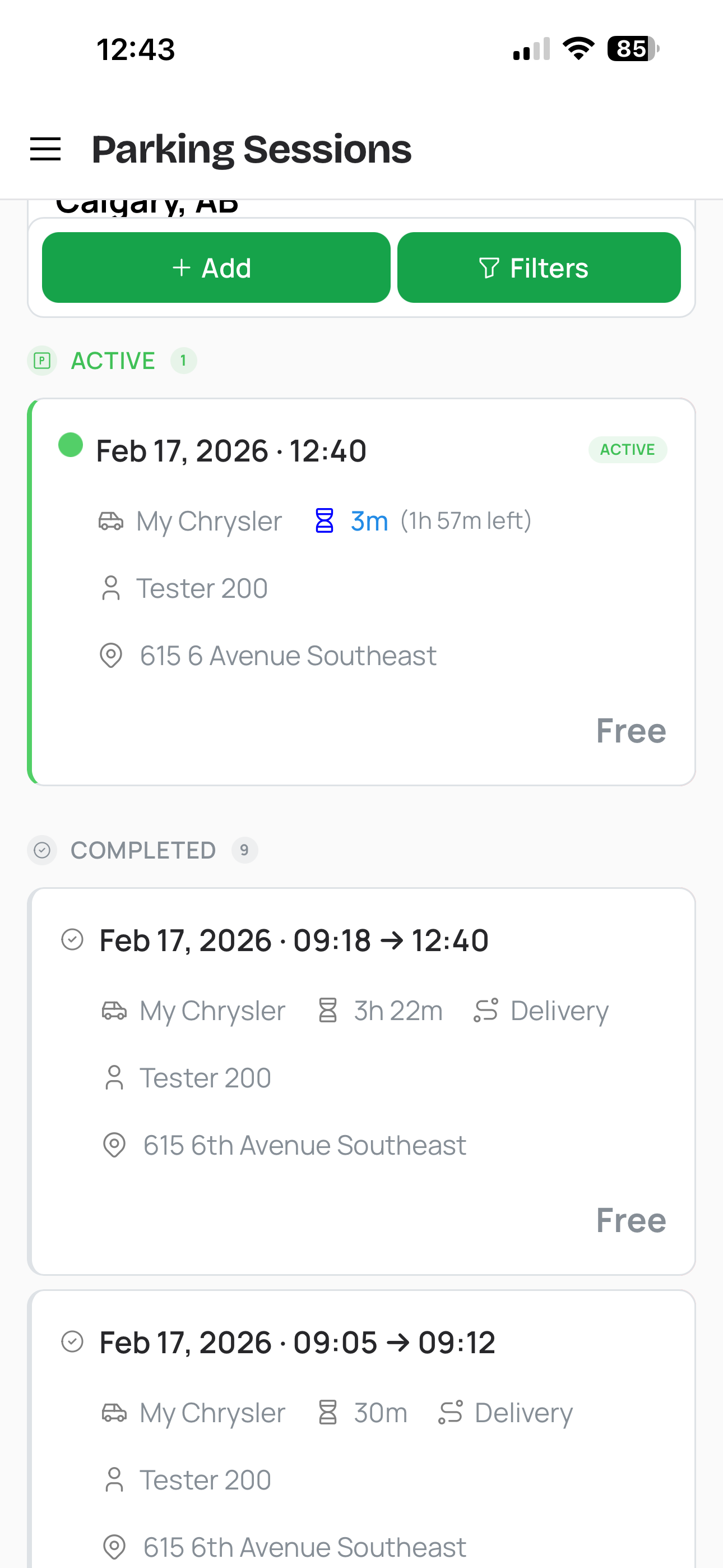
Parking sessions history
Built for every parking scenario
CarExpenses' parking tracker handles the full range of real-world vehicle parking management situations — from a quick errand to a week at the airport.
Parking tracking that fits into your complete vehicle cost picture
Unlike standalone parking apps that exist in isolation, CarExpenses is an all-in-one car expense tracker where parking is part of your complete vehicle expense record. As a vehicle expense tracker with built-in parking, it shows parking costs alongside fuel, maintenance, insurance, tolls, and every other vehicle-related expense — giving you a true cost-per-trip picture of what each vehicle costs to own and operate.
Link parking sessions to travel records so trip costs include every stop along the way. Run expense reports that include parking totals by vehicle, by month, or by category. Need a parking reimbursement from your employer? Export the records. At tax time, filter for parking expenses with full location and date details — ready for your accountant or CRA/IRS documentation.
For gig economy drivers, delivery couriers, and rideshare operators, this matters most. CarExpenses doubles as a delivery driver expense tracker that captures parking alongside mileage and other costs. Parking fees are a tax-deductible business expense for self-employed workers, separate from the standard mileage rate — but only if you have records. A proper parking tax deduction requires dates, amounts, and business purpose. CarExpenses creates those records automatically, every time you park.
Works on any device, no app store required
CarExpenses is a Progressive Web App — a parking tracker app that runs in any modern browser on your phone, tablet, or computer. No download from the App Store or Google Play needed. Your parking sessions, expenses, and vehicle data sync across every device. Start a parking session on your phone at the meter, check the countdown from your laptop at the office, and end the session from your tablet when you get home.