
Your car insurance costs the same every month. Your loan payment hits on the same date. Your parking permit renews every quarter. These are predictable, recurring costs — yet most vehicle expense trackers make you enter them by hand every single time. That's twelve manual entries a year for insurance alone, plus another twelve for the loan, plus four for parking. It's tedious, it's easy to forget, and every missed entry is a gap in your expense history that makes your spending reports and cost-of-ownership calculations less accurate.
CarExpenses scheduled expenses fix this. Define the cost and the schedule once, and the app creates the expense entries automatically — with the same level of detail as if you'd entered each one by hand. Your records stay complete, your reports stay accurate, and you stop doing repetitive data entry for costs that never change.
Stop entering the same payment over and over
Some vehicle costs are unpredictable — a flat tire, a broken windshield, an unexpected repair. But many of the biggest recurring costs are completely predictable: you pay the same insurance premium every month, the same loan installment on the same date, the same parking permit fee every quarter, the same registration renewal every year. Entering these manually each time is tedious, error-prone, and easy to forget — which means your expense history ends up with gaps.
Scheduled expenses in CarExpenses let you define a cost template once and generate all the entries automatically on the schedule you set. Your expense history stays complete and accurate without repetitive data entry, and your spending reports reflect the true total cost of ownership — including the fixed recurring costs that most drivers forget to track because they happen on autopilot.
Flexible scheduling — weekly, monthly, yearly, or one-time
Creating a scheduled expense starts with the same information as any regular expense: select the vehicle, choose an expense category (any type except refuels), and fill in the cost template with a full breakdown — parts, labor, fees, taxes, and total. Add a currency (or use your home currency by default), a place name and location, notes, and comments. Everything you enter becomes the template that each generated expense inherits.
Then define the schedule. CarExpenses supports four schedule types:
Weekly — pick one or more days of the week. Useful for weekly parking permits or recurring weekly services.
Monthly — pick specific days of the month: the 1st, the 15th, the last day, or any combination. Need two payments a month? Select both dates — for example, the 1st and 15th. Perfect for insurance premiums, loan payments, and monthly parking.
Yearly — pick one or more dates in the year (for example, January 15 and July 15). Ideal for annual registration renewals, yearly inspection fees, or semi-annual insurance payments.
One-time — target a specific future date. Useful for a known upcoming cost that you want pre-entered in your expense history, like a scheduled major service or an upcoming registration transfer fee.
Every schedule has a start date and an optional end date. Leave the end date empty and the schedule runs indefinitely — perfect for ongoing payments with no fixed term. Set an end date to match a lease term or a loan payoff date.
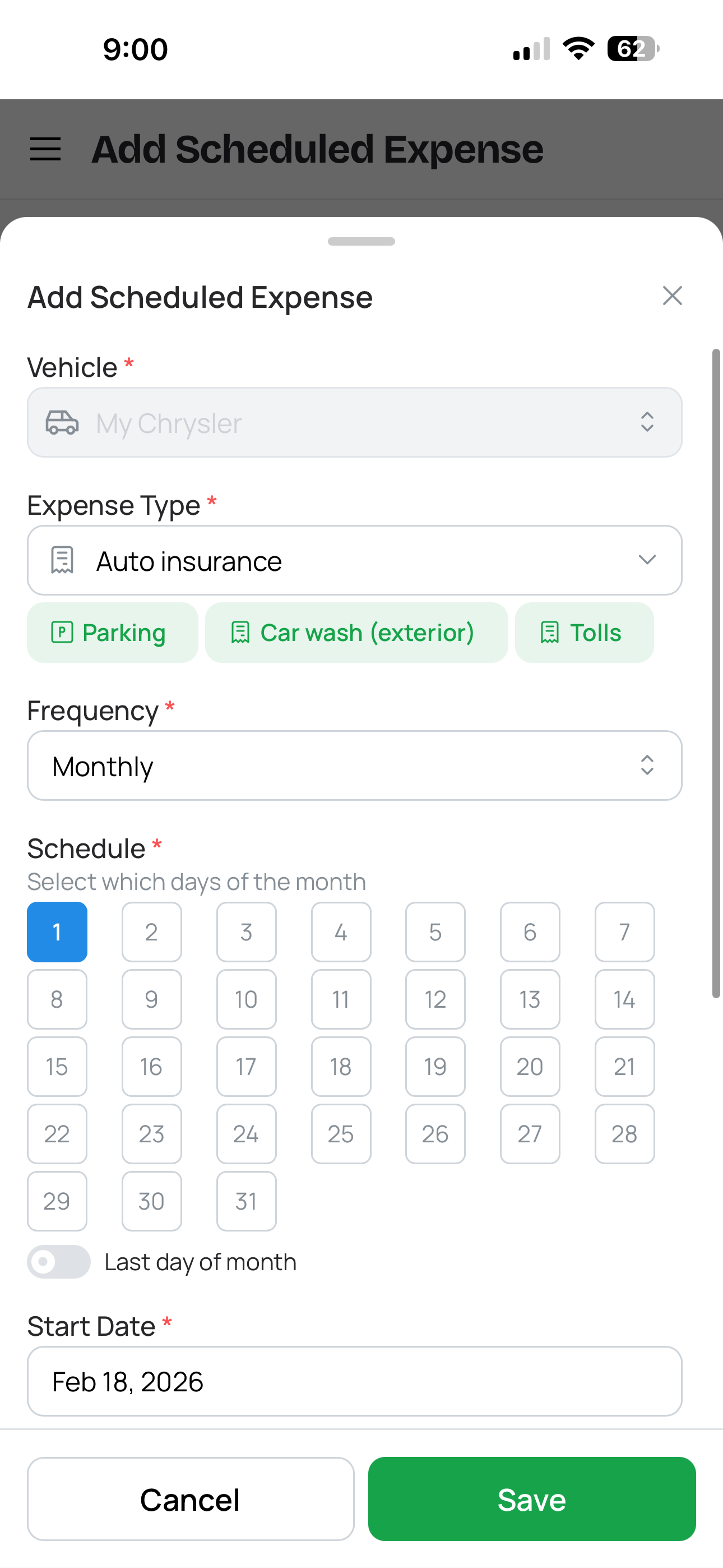
Configuring a monthly scheduled expense
Cost template — full detail on every generated expense
Each scheduled expense carries a cost template that defines what every generated entry will contain. This isn't just a dollar amount — it's a complete expense record with the same detail you'd enter manually: parts, labor, fees, taxes, and total. If your monthly insurance premium is $185 with $12 in taxes, the template captures both. If your lease payment is $450 with a $15 admin fee, the template captures that too.
The template also includes the currency, location (place name and address), notes, and comments — all carried over to each generated expense. This means your auto-generated entries are indistinguishable from manually entered ones in quality and detail. They show up in your expense list, your spending reports, your cost-per-mile calculations, and your category breakdowns with full information — not just a bare amount.
Backfill past expenses — complete history from day one
Starting to track expenses mid-year? Already been paying insurance for six months but only just set up CarExpenses? No problem. Backfill past expenses by creating a schedule with a start date in the past. The app generates all the entries between the start date and today in one operation — so your expense history is complete from the date you choose, not just from the date you remembered to set up the schedule.
This is especially useful when onboarding a vehicle into CarExpenses. Set up your insurance schedule starting from the policy start date, your loan payment schedule starting from the first installment, and your parking permit from when you first started paying — and your expense history immediately reflects the full cost of ownership from the beginning, not just going forward.
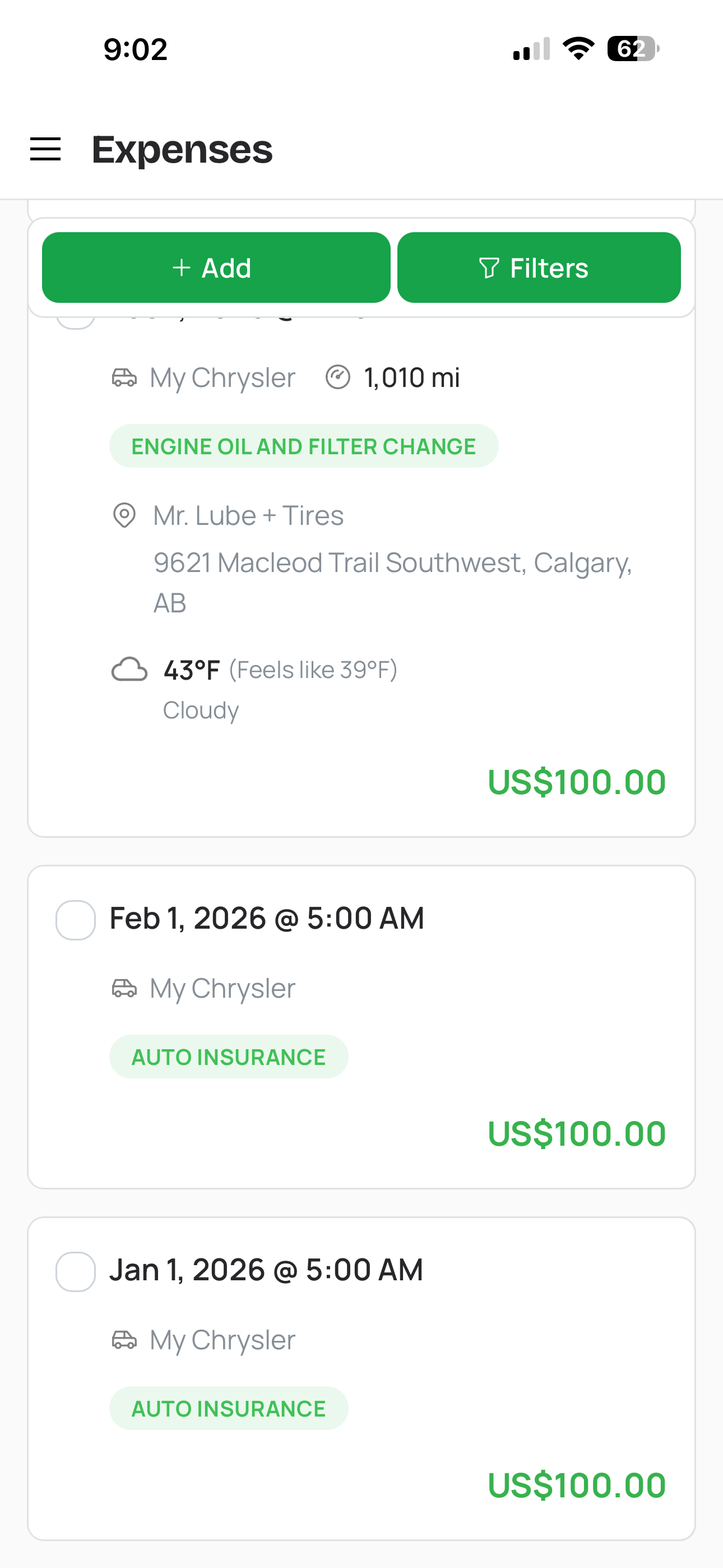
Backfilling of insurance premiums
Bulk updates and individual edits — automation with full control
Real life isn't perfectly uniform. Your insurance premium changes at renewal. Your parking rate goes up. Your loan payment stays the same but you make an extra payment one month. Scheduled expenses handle all of this with a clear approach:
When a recurring amount changes — for example, your insurance premium increases at renewal — end the current schedule and create a new one with the updated amount and new date range. This preserves your history accurately: the old entries reflect the old amount for the period they applied, and the new entries reflect the new amount going forward. Your expense reports show exactly what you paid and when the cost changed.
Bulk regenerate for corrections — if you entered the wrong amount when setting up a schedule, update the template and regenerate. This re-creates all expenses in the schedule from the corrected template — useful for fixing a mistake that affected every entry, not for applying a future price change to past records.
Individual expense editing — any expense created by a schedule is still a regular expense that can be edited independently. If a particular payment differed from the template — a partial payment, a late fee, a one-time discount — edit just that entry without affecting the rest of the schedule.
The result is a system that's hands-off for the predictable pattern but gives you the right tool for every exception: new schedule for price changes, bulk regenerate for corrections, individual edits for one-off differences.
Scheduled expenses feed into your complete cost picture
Expenses created by schedules are regular expenses in every way. They appear in your vehicle's expense list alongside manually entered costs. They feed into your spending reports and cost-per-mile calculations. They show up in category breakdowns. They count toward your vehicle's total cost of ownership. The only difference is how they were created — the schedule generated them instead of you typing them in.
This means scheduled expenses work seamlessly with everything else in CarExpenses. Your expense tracker shows the complete picture — one-off repairs next to recurring premiums. Your dashboard reflects all upcoming and recent costs. Your reports include fixed recurring expenses alongside variable ones, giving you an accurate view of what each vehicle truly costs you per month, per year, and per mile.
Built for every recurring vehicle cost
If you pay it on a schedule, CarExpenses can track it automatically — so your expense history stays complete and your reports stay accurate.
Works on any device, no app store required
CarExpenses is a Progressive Web App that runs in any modern browser on your phone, tablet, or computer — no app store download required. Create and manage scheduled expenses from any device. Review generated entries, adjust templates, and check your expense history from wherever you are. Everything syncs across devices automatically.