
Tires are one of the most expensive and safety-critical parts of your vehicle, yet most car expense apps don't give them any special treatment — they're just another line item in a generic expense list. CarExpenses is different. It includes a full tire management system built for the way real drivers handle tires: multiple sets per vehicle, seasonal swaps, partial replacements, tread wear monitoring, and automatic cost tracking — all in one place.
Whether you switch between winter and summer tires twice a year, run all-seasons until they're bald, or manage tires across a family of vehicles, CarExpenses tracks every set, every swap, every mile, and every dollar — so you always know the condition, location, and cost of every tire you own.
Tire sets and tire inventory — organized by vehicle
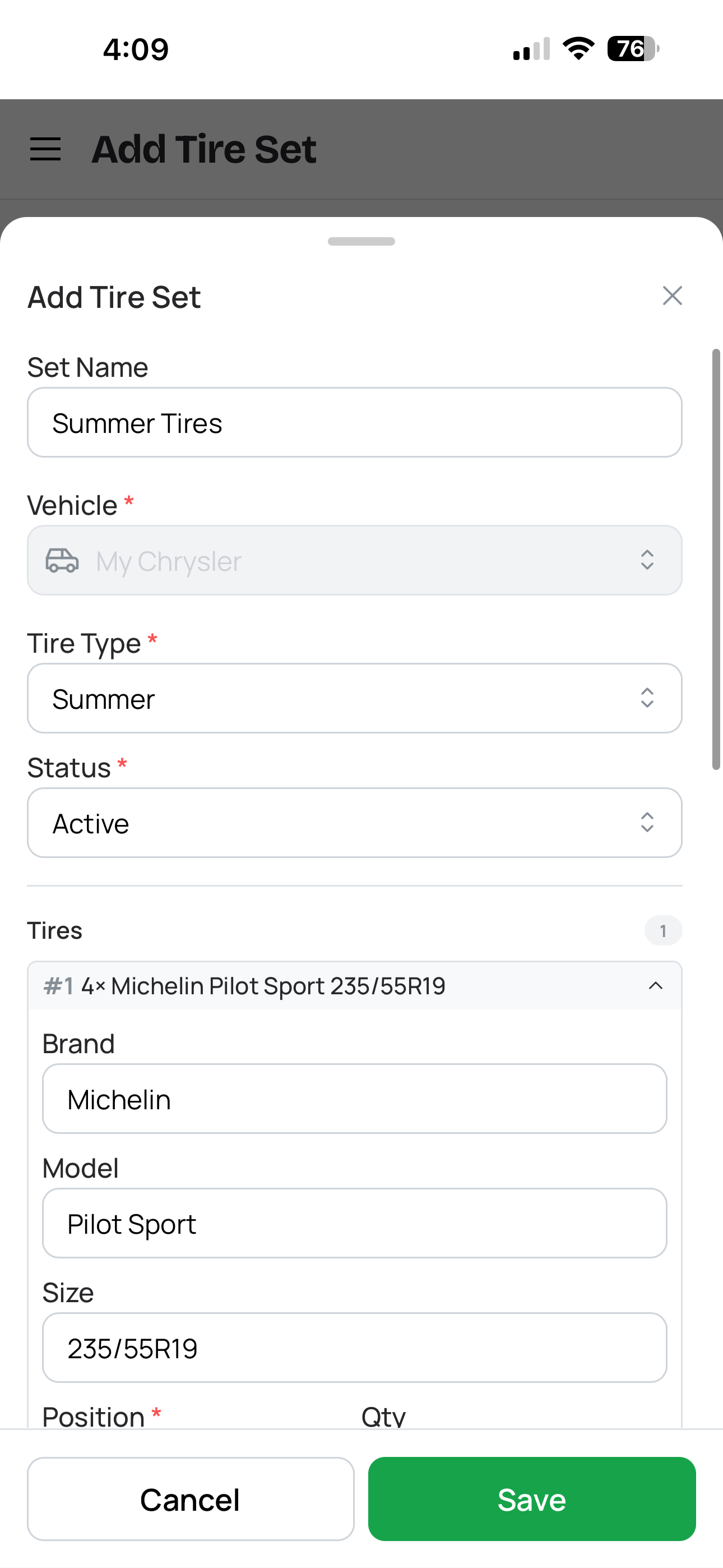
Adding a tire set for a vehicle
Open any vehicle in CarExpenses and you'll find a dedicated tire inventory where you can create and manage multiple tire sets — summer tires, winter tires, all-season, performance, whatever you run. Give each set a name, pick the season type, and add notes like the tire shop where they're stored or the date you bought them.
Each set tracks a group of tires with the details that matter: brand, model, size code, speed rating, load index, quantity, and the DOT manufacturing date code printed on every tire's sidewall. That four-digit DOT code tells you when the tires were made — and CarExpenses uses it to calculate tire age automatically, so you always know how old your rubber really is. Because drivers typically buy tires in pairs or full sets, CarExpenses groups them accordingly rather than forcing you to manage each tire one by one.
Real life isn't always symmetrical. Maybe you replaced two worn front tires with a different brand but kept the rears. CarExpenses handles partial tire replacements cleanly — add a new group of tires to the set, link the purchase expense, and the history stays intact. You can also record whether tires were new or used at purchase, with an estimated starting mileage for used tires so lifetime totals stay accurate from day one.
Three clear statuses: Active, Stored, and Retired
Every tire set in CarExpenses follows a clear lifecycle with three statuses:
Active — currently installed on the vehicle. Only one set can be active per vehicle at any time, so there's never confusion about which tires are on the car right now.
Stored — off the vehicle, sitting in your garage, at a tire shop, or at a seasonal tire storage facility. Record the storage location so you know exactly where to find them when swap day comes.
Retired — disposed of, sold, donated, or worn out. The history and expense records stay, but the set no longer appears in your active or stored inventory.
This structure keeps your tire inventory organized no matter how many sets you own or how often you rotate between them.
Seasonal tire swap — one step, everything handled
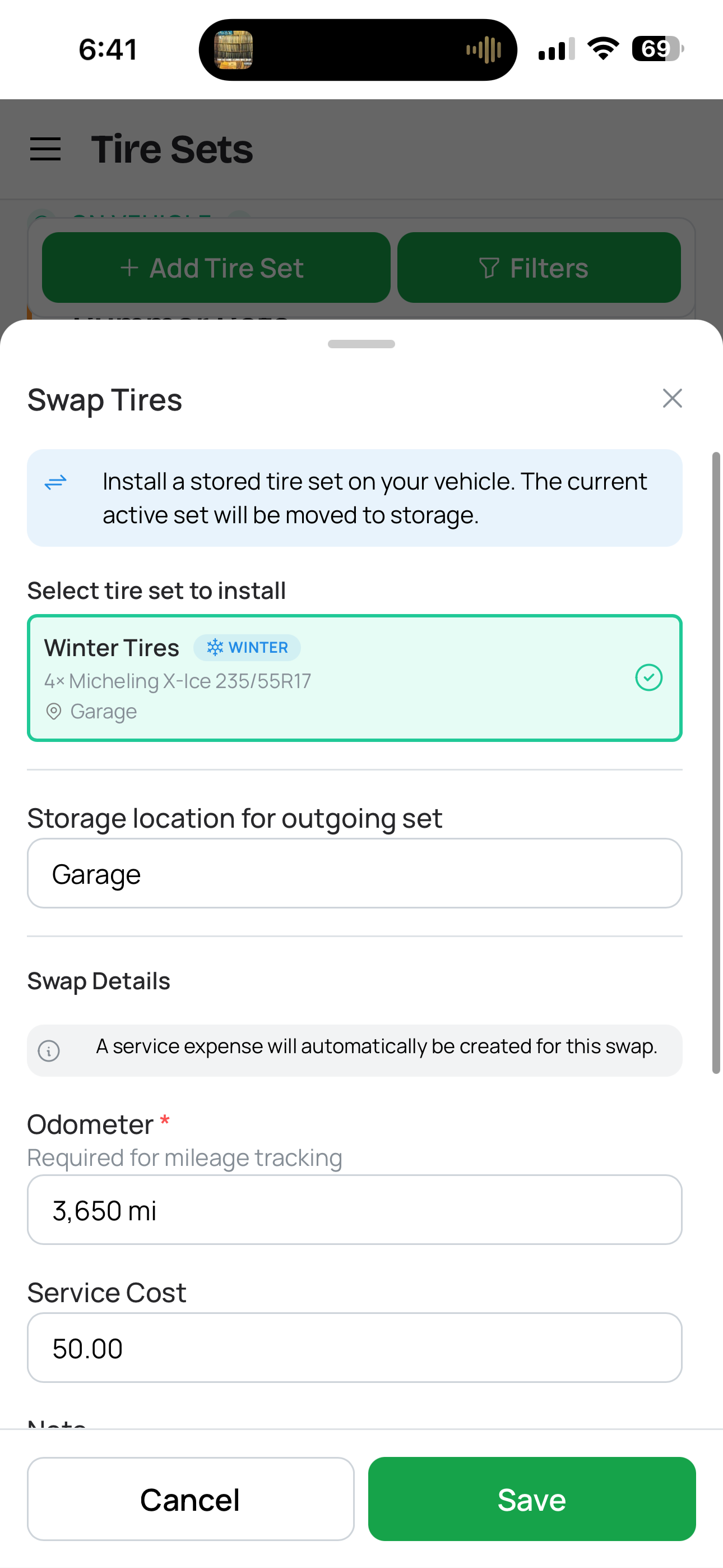
One-step seasonal tire swap
If you run separate summer and winter tires, you already know the twice-a-year routine: drive to the shop, swap the sets, try to remember which tires went where and how many miles were on them. CarExpenses turns that into a one-step seasonal tire changeover that takes care of everything at once.
Select the stored set you want to install, enter the swap date and the vehicle's current odometer reading. The app automatically moves the currently active set to storage with its accumulated mileage updated, and sets the incoming set as active with the current odometer as its new baseline. Optionally add the service shop location — with address auto-detection to fill in the details — and a price to create a linked service expense for the tire swap cost, including labor, balancing, and alignment fees.
The entire swap is one operation. No conflicting data, no manual mileage math, and a clear audit trail of every changeover you've ever done. Whether you call it a seasonal tire changeover, winter tire swap, or just "time to switch the tires" — CarExpenses logs it properly so you don't have to remember the details.
Tire mileage tracking — automatic, accurate, lifetime totals
How many miles are on your winter tires? Most drivers can only guess. CarExpenses tracks tire mileage automatically across every installation period. Each time a set comes off the vehicle — whether through a seasonal swap, a rotation, or a retirement — the app calculates the distance driven from the odometer delta and adds it to the set's lifetime mileage total.
Install a set for winter, store it for summer, reinstall it next winter — the total keeps growing across every period. For the currently active set, live mileage is computed on the fly from your vehicle's latest odometer reading, so you always see an up-to-date number without logging anything extra.
Bought the car with tires already on it? Picked up a used set from a friend? Enter an estimated initial mileage for used tires so lifetime totals account for the wear they came with. All distances are stored internally in kilometers and converted to your preferred unit — miles or kilometers — everywhere in the app.
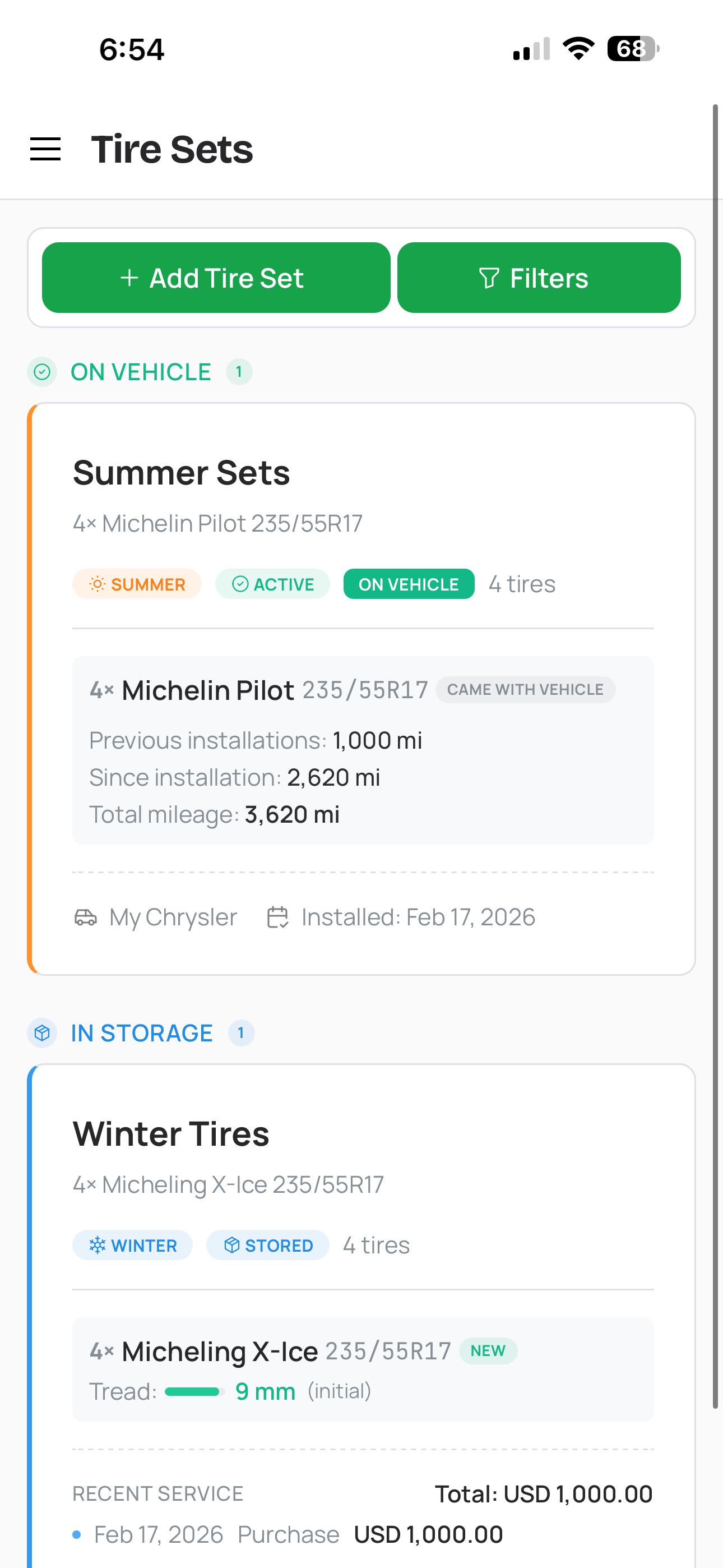
Tire mileage tracking
Tread depth monitoring — know when it's time to replace your tires
Tire tread depth is the single most important indicator of tire safety and remaining life. The legal minimum in most jurisdictions is 2/32″ (1.6 mm), but stopping distances start degrading well before that. CarExpenses lets you set a minimum tread depth on each tire set item and record the initial and latest tread depth measurements in millimeters — giving you a clear picture of where your tires started and where they stand now.
The warning system compares your latest measurement against the configured minimum and flags the set when tread is approaching or has reached the limit. No more penny tests and guesswork — enter the number from a tread depth gauge and let the app tell you whether it's time to start shopping for new tires or keep driving.
Tire wear and age warning system — never miss a replacement
CarExpenses runs a daily background check on every tire set across your account, evaluating multiple safety factors and flagging issues with color-coded warning badges that appear on tire set cards and in the edit drawer. Here's what the system monitors:
Tire age warnings — parsed from the DOT manufacturing date code on each tire. Flagged at 70% and 100% of the configurable age limit (default: 10 years). Most tire manufacturers recommend replacement after 6 to 10 years regardless of tread condition, and CarExpenses tracks this for you automatically.
Mileage warnings — based on total lifetime distance against the tire's mileage warranty threshold (default: 80,000 km / 50,000 mi). Flagged at 70% and 100% so you can start shopping before you're driving on borrowed time.
Tread depth alerts — compared against a configurable minimum tread limit (default: 2.0 mm / 2/32″). Warning at 130% of the limit and critical at the limit itself. You'll know when tread is getting low long before it becomes unsafe.
Stale tread measurement — flagged when the last tread depth reading is older than 12 months. A nudge to check your tires, because tread wear data is only useful if it's current.
Extended storage alert — flagged when a stored set has been sitting for an unusually long period. Rubber degrades even in storage, and this reminder helps ensure you don't forget about a set that should be inspected or retired.
Every default threshold — mileage warranty, age limit, minimum tread depth — can be overridden per tire set. Performance tires and budget all-seasons don't wear the same, and your warning thresholds should reflect that.
Tire expense tracking — every purchase and service linked automatically
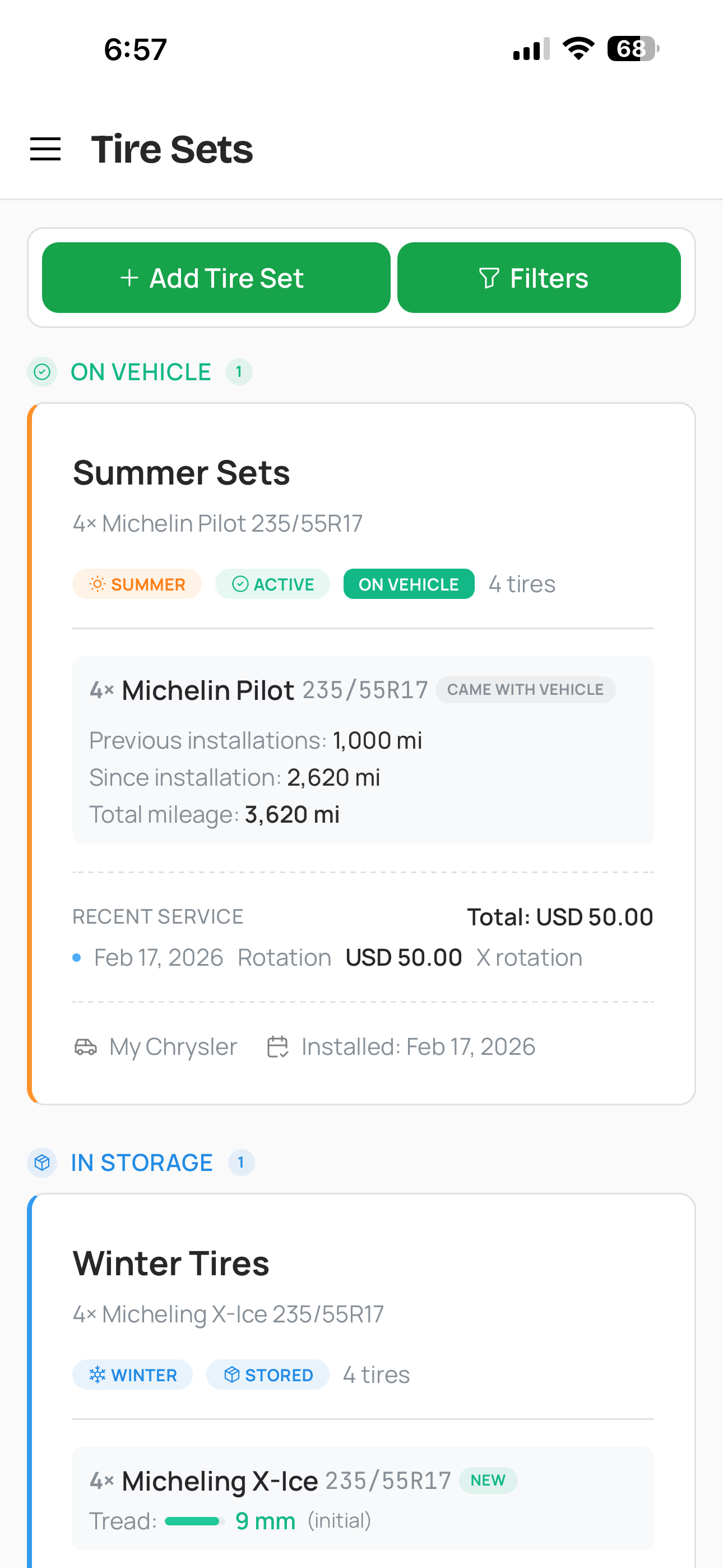
Tire expense timeline on a set card
Tire operations in CarExpenses integrate directly with the expense tracking system, so you never have to log tire costs separately. Here's how the two work together:
- Purchase a new tire set — Create a purchase expense when adding a new set. The cost links directly to the set and the tire groups in the transaction.
- Replace tires within a set — Log an additional expense when partially replacing tires in an existing set — for example, two new fronts while keeping the rears.
- Seasonal swap — Tire changeover operations automatically generate a service expense record with the shop name, date, and cost.
- Tire rotation — Log tire rotation services as linked expenses to keep a complete record of every rotation interval, shop visit, and cost.
- Review tire spend — A mini expense timeline on each tire set card shows recent service history and running totals at a glance.
All tire expenses feed into your vehicle's overall cost analysis. See how much tires contribute to your total cost of ownership and understand what you're really spending on rubber — not just the sticker price at the tire shop, but every swap, rotation, and replacement over the life of each set.
Built for every tire management scenario
Whether you swap tires seasonally, run one set year-round, or manage tires across a family fleet — CarExpenses has you covered.
Tire tracking that fits into your complete vehicle cost picture
Tires are one of the largest recurring maintenance expenses for any vehicle, yet most expense trackers don't have a dedicated way to track them. In CarExpenses, tire costs sit alongside fuel, oil changes, repairs, insurance, and every other vehicle expense — giving you a true total cost of ownership that includes the full lifecycle of your tires.
Run expense reports that break out tire spending by vehicle, by time period, or by expense category. Compare what you spent on winter tires versus summer tires. See the total cost of each set across purchases, swaps, and rotations. For gig drivers, delivery couriers, and rideshare operators, tire expenses are a deductible business cost separate from mileage — and CarExpenses creates the records you need at tax time with dates, amounts, and linked vehicles.
Works on any device, no app store required
CarExpenses is a Progressive Web App — a tire tracker that runs in any modern browser on your phone, tablet, or computer without downloading anything from an app store. Your tire inventory, swap history, tread measurements, and warning alerts sync across every device. Check your tire status from your phone at the shop, review swap history on your laptop, or log a tread measurement from your tablet in the garage.