Life with a car means a never-ending list of things to remember — renew the registration, schedule the inspection, swap to winter tires, replace the wipers, follow up on that recall notice. Most car maintenance tracker apps ignore this entirely, leaving you to manage vehicle to-dos in a separate notes app, a spreadsheet, or your own memory. CarExpenses includes a built-in vehicle task manager that keeps everything in one place — right alongside your expenses, refuel logs, and service records.
Create tasks per vehicle or for your account as a whole. Set due dates, priorities, and categories. Let recurring schedules handle the things that come back every year. Assign tasks to family members or teammates. And see everything that needs attention across all your vehicles from a single dashboard — no digging, no forgetting, no surprises.
Task basics — due dates, priorities, categories, and a simple workflow
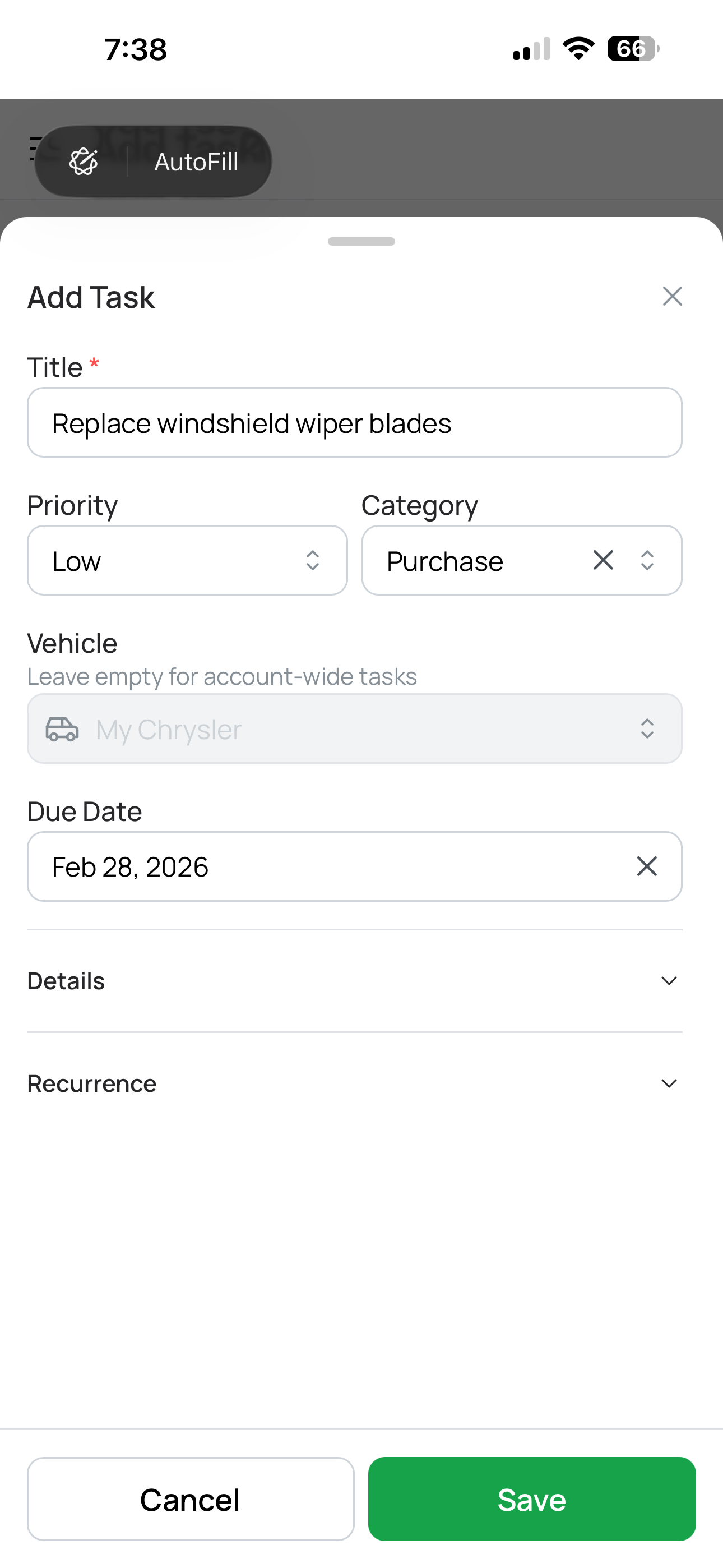
Creating a vehicle task
Open any vehicle in CarExpenses and you'll find a dedicated task list where you can create and manage everything that needs doing — from buying new wiper blades to scheduling an annual inspection. You can also create account-level tasks that aren't tied to a specific vehicle, like renewing your driver's license or comparing insurance quotes.
Every task has a due date, a priority level (low, medium, or high), and a category that helps you organize what type of work it is — purchases, appointments, seasonal prep, repairs, administrative items, and more. High-priority tasks stand out with colored borders and badges so they're impossible to overlook. Add notes and details to capture everything you'll need when it's time to act, so nothing gets lost between "I should do this" and actually doing it.
Tasks follow a simple three-step workflow: To Do → In Progress → Complete. No complicated Kanban boards or project management overhead — just a straightforward progression that matches how most vehicle tasks actually work. When something is done, mark it complete. It stays in your history as a record of what was handled and when.
Smart recurrence — set it once, never forget again
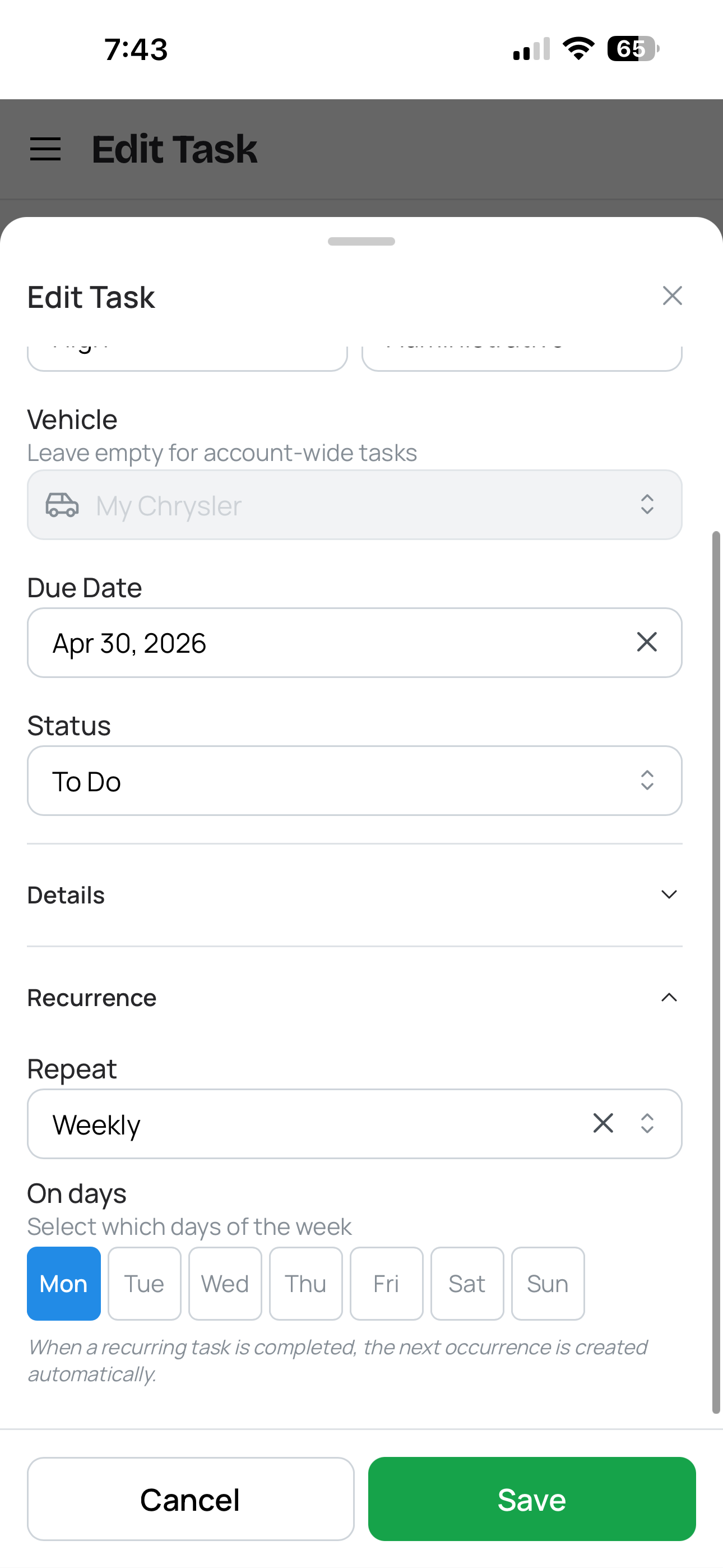
Some vehicle tasks only happen once — replace the cracked windshield, fix that dent. But many of the most important ones come back on a schedule: annual registration renewals, seasonal tire swaps, quarterly fluid checks, monthly car washes. CarExpenses lets you set tasks to repeat weekly, monthly, or yearly, so recurring maintenance and administrative items take care of themselves.
When you complete a recurring task, the next occurrence is automatically created with the correct due date based on the schedule you set. There's no need to remember to re-add the task or manually calculate the next date — the recurrence engine handles it. Complete your November tire swap task, and the next one appears due the following November.
This is especially useful for tasks that are easy to forget until it's too late — registration renewals that sneak up on you, seasonal inspections with filing deadlines, or insurance policy reviews you mean to do every year but never quite get around to. Set it once, and the schedule keeps you on track indefinitely.
1 of 3
Dashboard at a glance — see every vehicle's tasks in one view
Your CarExpenses dashboard gives you a single-screen overview of every task across all your vehicles. No need to open each vehicle individually to check what's pending — the dashboard brings everything together and surfaces what matters most.
Overdue tasks appear at the top in red — impossible to miss or scroll past. Tasks due soon and those already in progress appear next, ordered by urgency. Every task card shows a visual countdown: "3 days left," "due tomorrow," or "overdue by 2 days," so you always know where things stand at a glance without opening each task individually.
The result is a vehicle maintenance command center that works whether you have one car or five. Open the app, see what needs attention today, and handle it — or assign it to someone who can.
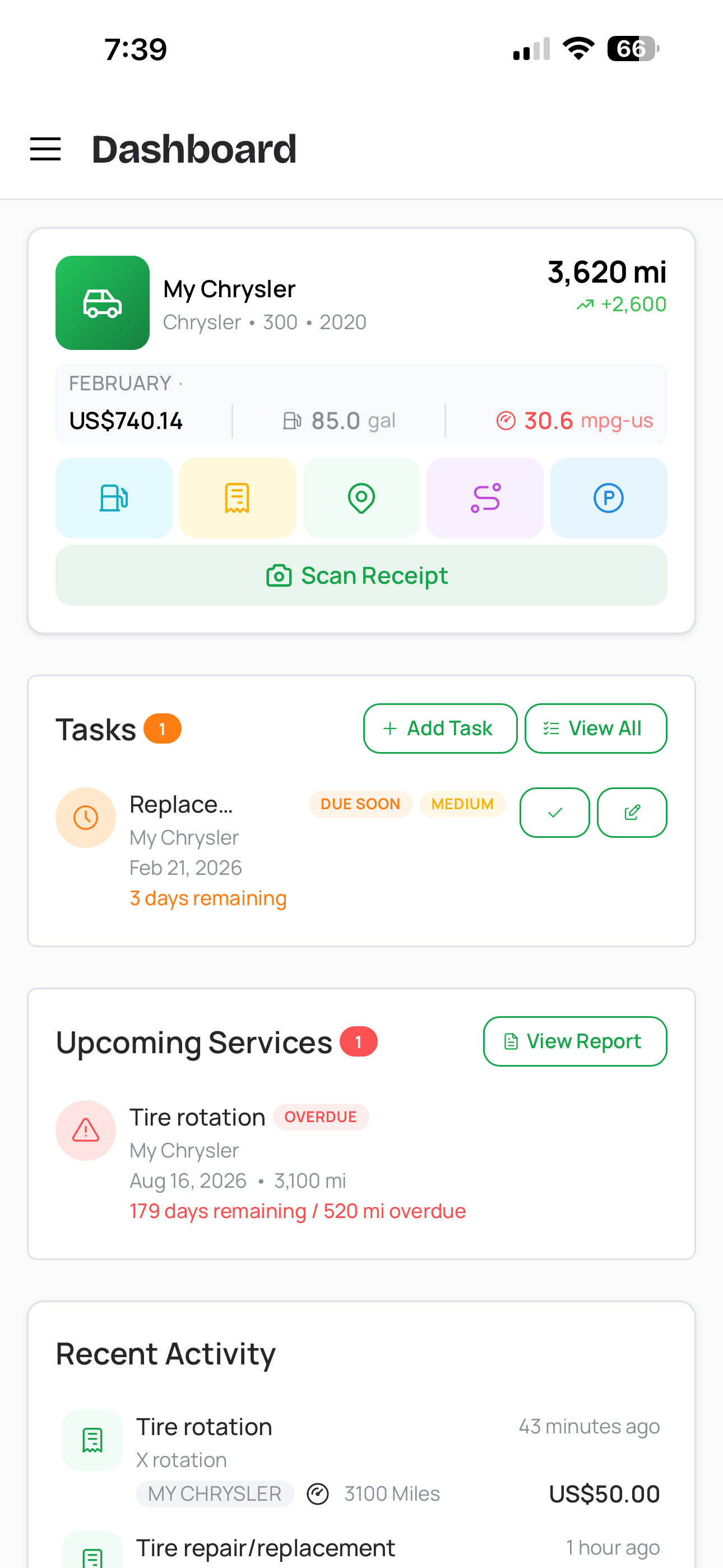
Task dashboard overview
Task categories — organized from day one
Not all vehicle tasks are created equal. A tire rotation appointment is different from buying new floor mats, which is different from filing an insurance claim. CarExpenses lets you categorize every task so your to-do list stays organized as it grows. Built-in categories cover the most common scenarios: purchases (parts, accessories, supplies), appointments (service bookings, inspections), seasonal prep (tire swaps, winterization), repairs (bodywork, mechanical fixes), administrative (registration, insurance, documentation), and more.
Categories help you filter and find tasks quickly, and they give your task history meaningful structure over time. Look back at a year's worth of completed tasks and see at a glance how many were repair-related versus routine maintenance — useful context when you're evaluating a vehicle's reliability or planning next year's maintenance budget.
Tasks, Maintenance Reminders, and Glovebox — three tools, one dashboard
CarExpenses has three features that help you stay on top of vehicle ownership, and each one works differently because it solves a different problem. Here's how they fit together:
Vehicle Tasks are your call-to-action list — specific things that need to get done by a specific date. "Book the tire swap appointment by October 15." "Buy replacement wipers this weekend." "Transfer the registration before Friday." Each task has a due date, a priority, an assignee, and a workflow that moves from To Do to Complete. Tasks are things you decide to do and you schedule — they represent your plan of action.
Maintenance Reminders are condition-based alerts tied to how your vehicle is actually used. Instead of a calendar date, they trigger based on mileage or time since the last service — whichever comes first. Set an oil change reminder for every 5,000 miles or 12 months, a tire rotation every 8,000 miles, or a brake fluid flush every 2 years. The app watches your odometer readings and the calendar, and flags the reminder when a service interval is approaching or overdue. You don't choose when these come due — your driving determines that.
Digital Glovebox stores your vehicle's important documents and equipment — registration cards, insurance policies, warranty certificates, roadside assistance memberships, fire extinguishers, first aid kits — each with an optional expiration date. The app surfaces expiring and expired items on your dashboard as a passive heads-up that something needs renewing. The Glovebox doesn't tell you what to do about it — it just tells you something is expiring. That's where tasks come in: when you see your insurance is expiring next month, you create a task to shop for a new policy and set a due date.
In short: Maintenance Reminders watch your vehicle's service intervals and tell you when maintenance is coming due. Glovebox tracks document and equipment expiration dates and tells you when something needs renewing. Tasks are where you plan and track the actual work — the specific actions you or your team will take in response to those reminders, or for anything else that needs doing. All three surface on your dashboard together, giving you one clear view of everything that needs attention.
Built for every vehicle task scenario
Whether you manage one car or a small fleet, handle everything yourself or share the load with family — CarExpenses keeps your vehicle to-do list under control.
Tasks that fit into your complete vehicle management picture
Vehicle tasks sit alongside your expense history, refuel logs, service records, and tire management — giving you a complete picture of every vehicle you own in a single app. When you complete a task like "get oil changed," the service expense you log that day provides the cost record while the completed task provides the action record. Together, they tell the full story: what was done, when, by whom, and how much it cost.
For gig drivers, delivery couriers, and rideshare operators, having a task system inside the same app that tracks mileage and expenses means your vehicle maintenance stays organized alongside the data you need for tax time. For families, it means one place to manage every vehicle and every driver — no more shared notes apps, fridge magnets, or text message chains trying to coordinate who's handling what.
Works on any device, no app store required
CarExpenses is a Progressive Web App that runs in any modern browser on your phone, tablet, or computer — no app store download required. Your vehicle tasks, due dates, priorities, and completion history sync across every device. Add a task from your phone at the mechanic's shop, check the dashboard on your laptop at home, or mark something complete from your tablet. Everything stays in sync.