You're standing on the side of the road after a fender bender and need your insurance policy number. You're at a toll booth and can't remember your transponder account details. You're on the phone with roadside assistance and they're asking for your membership ID. The information exists somewhere — on a card in your wallet, in an email from two years ago, in a stack of papers at home — but it's never where you need it, when you need it.
The Digital Glovebox in CarExpenses solves this by putting every important vehicle detail in one organized, searchable, always-accessible place. Insurance policy numbers and emergency phone numbers. Registration details. Warranty coverage and claim contacts. Roadside assistance membership IDs. Loan and lease terms. Safety equipment records. All of it available on your phone, tablet, or computer — with optional expiration tracking that alerts you on your dashboard before anything lapses.
Key details at a glance — policy numbers, phone numbers, and every document you need
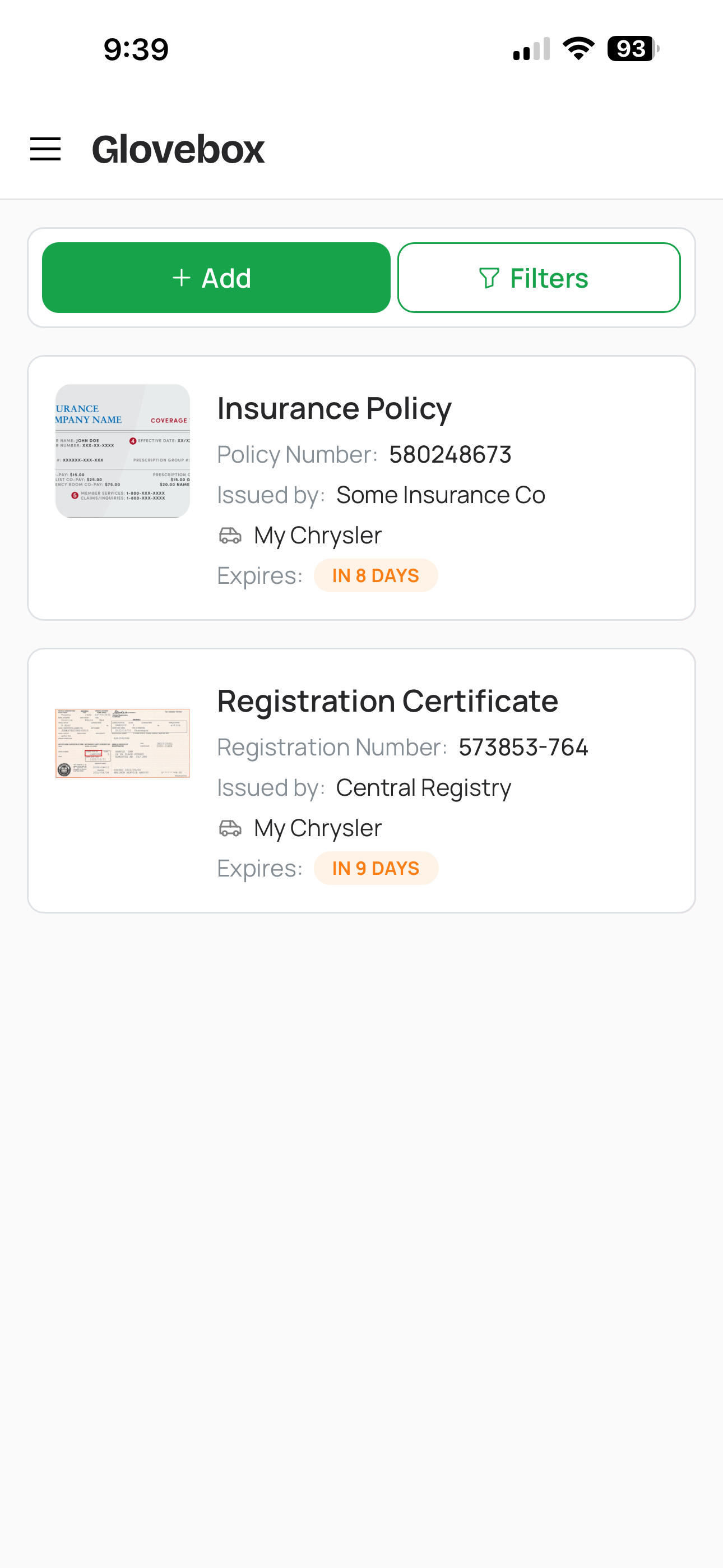
Vehicle documents in the Digital Glovebox
The Digital Glovebox is built around a simple idea: the information you need most should be the easiest to find. Every document entry stores the key details front and center — policy numbers, membership IDs, emergency phone numbers, coverage summaries, reference numbers, account details — so you can glance at the entry and get what you need without opening an attachment or hunting for the original paperwork.
Store any document type your vehicle needs: insurance policies with policy numbers, coverage details, and your insurer's claims phone number. Registration cards and title documents with plate and VIN info. Roadside assistance cards with the membership number and emergency phone number you'll need when you're stranded. Warranty certificates and extended service contracts with coverage terms and claim contacts. Purchase agreements and loan or lease paperwork. Safety inspection records, emissions certificates, parking permits, toll transponder information, driver's licenses, and international driving permits.
For the details that don't fit in a text field, attach the actual files: snap a photo of both sides of your insurance card, scan the registration, upload the warranty PDF, photograph the roadside assistance card. The attachment lives right on the entry — so when the police officer asks for your insurance or the tow truck operator needs your membership number, everything is one tap away on your phone.
Safety equipment tracking — first aid kits, fire extinguishers, and more
Your vehicle carries more than just documents. First aid kits, fire extinguishers, warning triangles, reflective vests, tire repair kits, jumper cables, tow straps — the safety equipment you keep in your car matters for both your safety and, in many jurisdictions, legal compliance. The Digital Glovebox tracks all of it.
Create an entry for each piece of equipment with its type, brand, location in the vehicle, and — critically — its expiration date where applicable. First aid kits have expiry dates on their contents. Fire extinguishers have inspection dates and replacement intervals. Even reflective vests and warning triangles can degrade over time. CarExpenses tracks these dates and alerts you when equipment is approaching or past its expiration, just like it does for documents.
For drivers in regions with strict roadside inspection requirements — much of Europe requires a warning triangle, reflective vest, and first aid kit in every vehicle — having a clear record of what's on board and whether it's current turns a potential fine into a non-issue. Know exactly what you have, where it is, and whether it's still valid, without popping the trunk to check.
Expiration tracking and dashboard alerts — never get caught off guard
The most valuable part of the Digital Glovebox isn't storage — it's expiration tracking. Every document and every piece of equipment with an expiration date is monitored automatically. When something is approaching its expiration, it shows up on your dashboard as a heads-up. When it's expired, it's flagged prominently so you can't miss it.
Insurance lapsing without your knowledge is more than an inconvenience — it's a legal and financial risk. A registration that expired two weeks ago turns a routine traffic stop into a problem. A first aid kit with expired contents is a safety liability. The Glovebox's expiration alerts are designed to catch these things before they become problems, giving you time to renew, replace, or act.
Alerts are passive and informational — the Glovebox tells you something is expiring, but it doesn't tell you what to do about it. That's where vehicle tasks come in: when you see your insurance is expiring next month, you create a task to shop for a new policy and set a due date. The Glovebox surfaces the alert; the task system handles the action.
Custom document and equipment types — track whatever you need
CarExpenses includes built-in types for the most common vehicle documents and equipment, but every driver's needs are different. Maybe you carry a satellite communicator for remote travel. Maybe your commercial vehicle requires a specific inspection decal. Maybe you want to track your EV charging network membership or your car club card. The Digital Glovebox lets you create custom document and equipment types for anything that doesn't fit the built-in categories.
Custom entries work exactly like built-in ones — they support expiration dates, attached files, notes, and dashboard alerts. The system is flexible enough to accommodate whatever you need to keep track of, without cluttering the interface with fields that don't apply to your vehicle.
Access from any device — your documents are never in the wrong car
The whole point of a digital glovebox is that it's always with you — not trapped in a specific car. Had an accident and need to give your insurance details to the other driver? It's on your phone. Broken down on the highway and need to call roadside assistance? The membership number and phone number are right there — no searching through your wallet or hoping the card is in the glove compartment of the car that won't start. At the dealership discussing a warranty claim? Pull up the coverage details and the original certificate on your phone while you're standing at the counter.
Everything in the Glovebox syncs across every device through CarExpenses. Check your registration renewal deadline from your laptop. Upload a scanned document from your tablet. Look up your lease-end date from your work computer. There's no separate app to install, no files to manually transfer, and no risk of having the information you need on the wrong device at the wrong time. If you can open the app, you have access to everything.
Glovebox, Maintenance Reminders, and Tasks — three tools, one dashboard
CarExpenses has three features that surface alerts on your dashboard, and each one serves a distinct purpose:
Digital Glovebox (this feature) stores your vehicle's documents and equipment and tracks their expiration dates. It's a passive information layer — it tells you something is expiring or expired, but it doesn't prescribe an action. It answers the question: "Is any document or piece of equipment about to expire?"
Maintenance Reminders are condition-based service alerts tied to your vehicle's usage. They trigger based on mileage driven or time elapsed since the last service — for example, oil change every 5,000 miles or 6 months. Your driving determines when they come due. They answer the question: "Is any maintenance service approaching or overdue?"
Vehicle Tasks are your call-to-action list — specific things you've decided to do by a specific date. "Renew the insurance by March 1." "Replace the first aid kit this weekend." Tasks have due dates, priorities, assignees, and a completion workflow. They answer the question: "What have I committed to doing, and by when?"
In practice, the three work together naturally. Your Glovebox shows that insurance expires next month. You create a task to shop for a new policy with a due date two weeks out. Meanwhile, a maintenance reminder alerts you that the oil change is due based on mileage — so you create another task to book the appointment. Glovebox and reminders surface what needs attention; tasks are where you plan and execute the response.
Built for every vehicle document and equipment scenario
Whether you need quick access to your insurance card, want to track safety equipment expiration dates, or share vehicle documents across your family — the Digital Glovebox has you covered.
Documents and equipment that fit into your complete vehicle picture
The Digital Glovebox sits alongside your expense history, refuel logs, maintenance reminders, tire management, and vehicle tasks — giving you a complete picture of every vehicle you own in a single app. Documents and equipment records add the administrative and compliance layer that most vehicle apps ignore entirely.
When you sell a vehicle, the Glovebox is part of the story you can show a buyer — a well-documented car with a history of current insurance, up-to-date inspections, and properly maintained safety equipment is worth more than one with a folder of crumpled receipts. And for your own peace of mind, knowing that every document is current and every expiration is tracked means one less thing to worry about as a vehicle owner.
Works on any device, no app store required
CarExpenses is a Progressive Web App that runs in any modern browser on your phone, tablet, or computer — no app store download required. Your Digital Glovebox, including all documents, equipment records, attached files, and expiration alerts, syncs across every device. Pull up your insurance card on your phone at a traffic stop, check expiration dates on your laptop, or upload a document scan from your tablet. Everything stays in sync automatically.