
Everything in CarExpenses starts with a vehicle. Before you can track expenses, log fuel, set maintenance reminders, or manage tires, you need a vehicle profile that tells the app what you're driving and gives it the baseline data — tank volume, starting odometer — that other features depend on. A well-filled profile takes a few minutes to set up and pays off every time you interact with the app.
Add cars, motorcycles, trucks, or any vehicle you own or manage. Store the specs, attach documents and photos, record purchase details, track the vehicle's status, and share everything with your family or team. Your vehicle profile is the single source of truth for everything about that vehicle — the foundation the rest of the app is built on.
Vehicle profile — make, model, VIN, and everything you'll need again
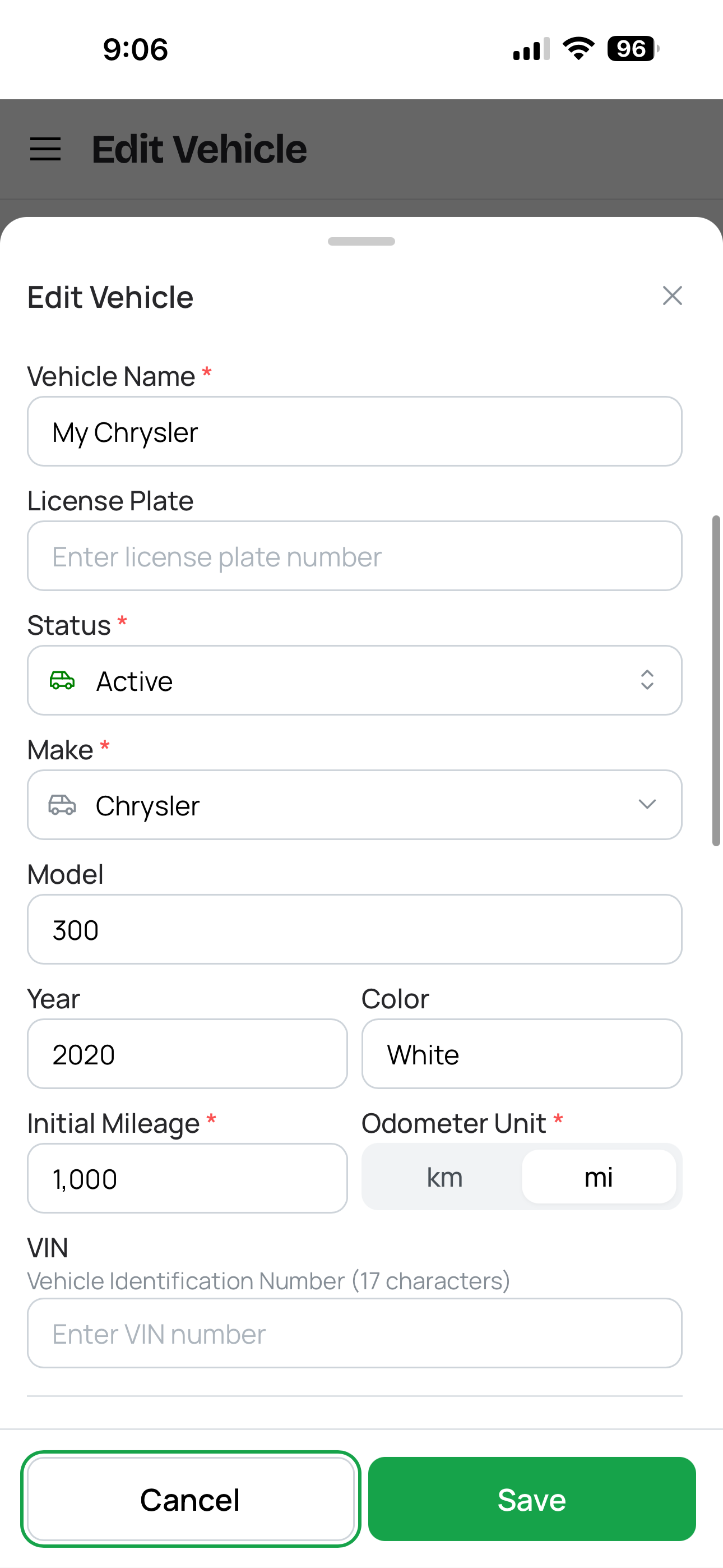
Vehicle profile with key details
Every vehicle in CarExpenses starts with a profile that stores the information you'll reference again and again. Give it a display name — "Mom's Civic," "Work Truck," "The Miata" — so you can tell your vehicles apart at a glance. Then fill in the details: make, model, year, color, and VIN (Vehicle Identification Number). The VIN is useful for insurance claims, warranty lookups, recall checks, and selling the vehicle — having it stored in the app means you don't need to walk out to the car every time someone asks for it.
Add a photo of the vehicle so the profile looks like your car, not just a text entry. Photos also serve as a visual record of the vehicle's condition at the time the picture was taken — useful if you photograph the car when you first add it to track condition over time.
The profile also includes a notes field for anything else worth remembering — the mechanic's phone number, the tire size you always forget, the parking stall number at your apartment, the paint code for touch-ups. Whatever doesn't fit in a structured field goes here.
Specifications — tank volume, engine, transmission, and quick reference details
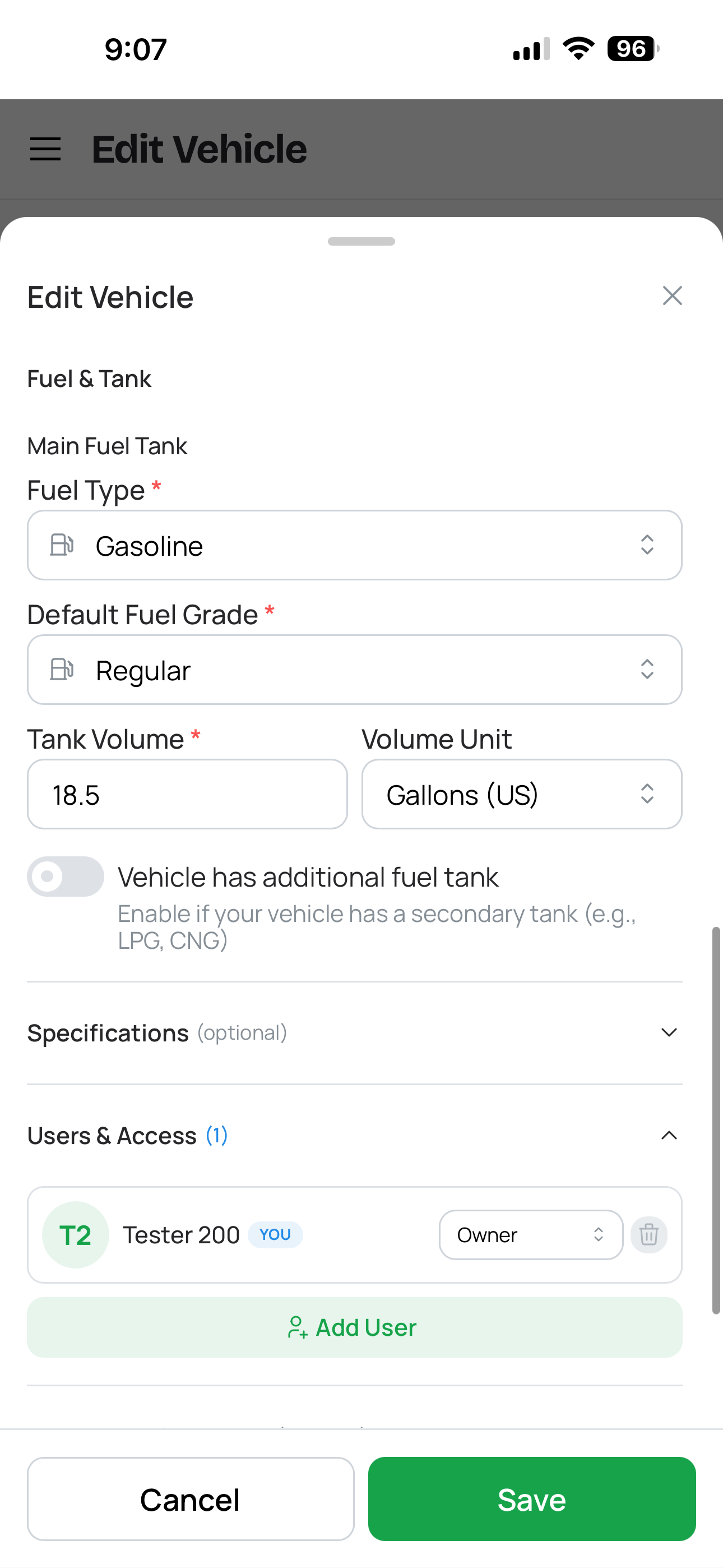
Beyond the basics, each vehicle profile stores technical specifications that other features in the app depend on: trim level, transmission type (manual, automatic, CVT, DCT), engine type, engine displacement, and — most importantly — fuel tank volume.
The fuel tank volume is worth entering carefully. The app uses this value to interpret tank level slider readings when you log partial fill-ups — it's how CarExpenses translates "three quarters of a tank" into an actual fuel volume for consumption estimates. If the tank volume is wrong, partial fill-up consumption numbers will be off. You can find your tank volume in the owner's manual or on the manufacturer's spec sheet. For vehicles with two fuel tanks (LPG conversions, plug-in hybrids), each tank gets its own volume setting.
Specifications aren't just for the app's calculations — they're also useful as a quick reference. Need to know the engine displacement for an insurance form? The transmission type for a parts order? The trim level for a warranty claim? It's all on the vehicle profile, accessible from any device.
1 of 3
Starting odometer — the baseline everything else builds on
When you add a vehicle to CarExpenses, one of the first things you'll enter is the current odometer reading. This is the baseline that everything else builds on — fuel consumption calculations, maintenance reminder intervals, tire mileage tracking, cost-per-mile calculations, and total distance driven statistics all start from this number.
Getting this right matters. If you enter 50,000 km when the car actually has 55,000 km, every distance-based calculation will be off by 5,000 km until the error is corrected. Take a moment to read the actual odometer — or photograph it as a checkpoint — when you first add the vehicle. You can choose whether to enter the reading in kilometers or miles based on your preference; the app stores everything in metric internally and converts to your display unit throughout.
Vehicle statuses — Active, Paused, On Maintenance, On Repairs, Sold
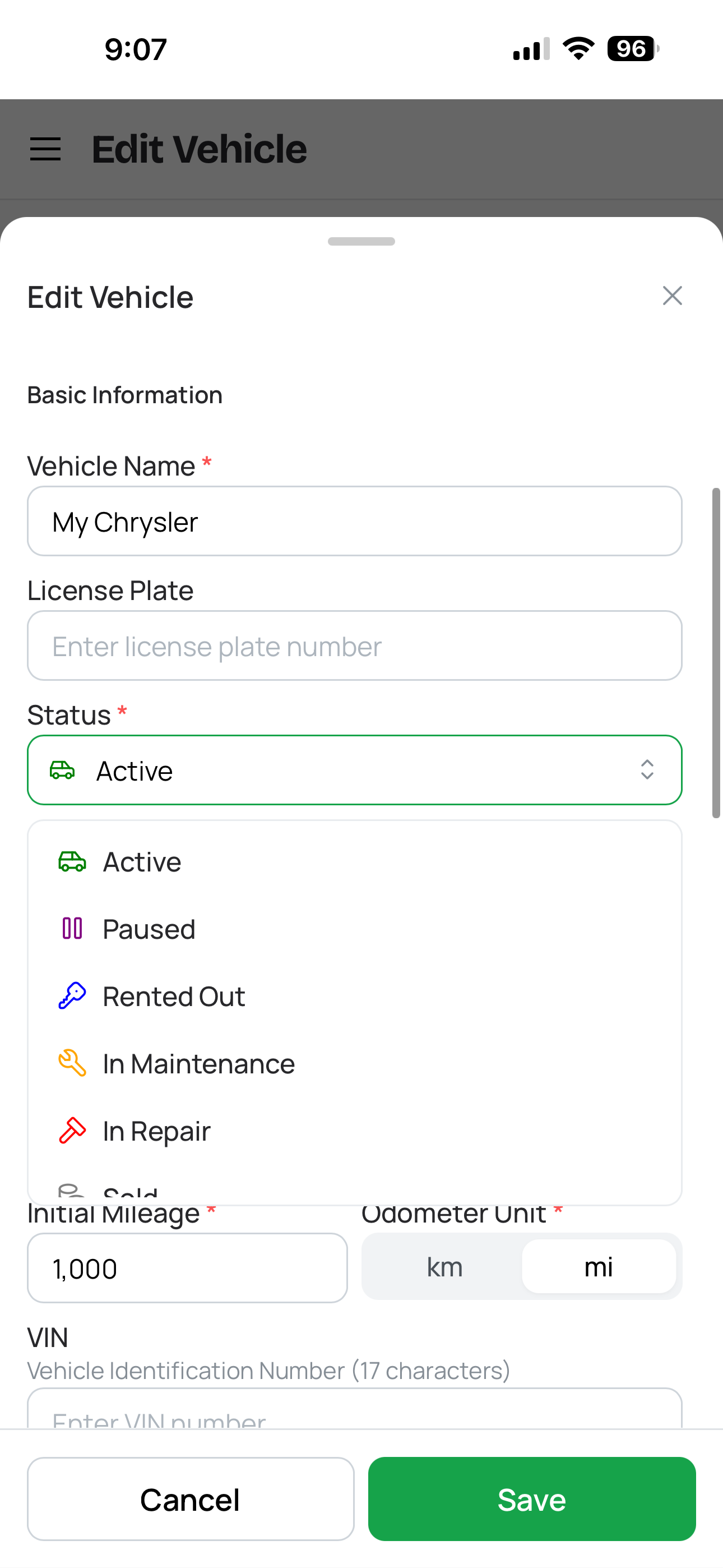
Vehicle statuses
Every vehicle in CarExpenses has a status that reflects its current situation. Five statuses cover the lifecycle of vehicle ownership:
Active — on the road and in regular use. This is the default status for most vehicles most of the time.
Paused — temporarily out of use. Maybe it's a seasonal car you store over winter, a vehicle you're not driving while traveling, or a car that's off the road waiting for a decision.
On Maintenance — at the shop for scheduled service. Oil change, tire swap, annual inspection — routine work that takes the car out of service temporarily.
On Repairs — in the shop for unplanned work. Accident damage, mechanical failure, warranty repair — something that needs fixing before the car goes back on the road.
Sold — no longer yours. The vehicle stays in your account with its full history intact, but it's clearly marked as sold so it doesn't clutter your active garage.
Statuses help you organize your garage at a glance — see which vehicles are available, which are in the shop, and which you've moved on from. Currently, status changes are a simple toggle without a built-in history of when and why each change happened. If you want to track the story behind status changes — why the car went to the shop, when it came back, what condition it was in — use checkpoints to log a dated note with details and photos each time the status changes. Over time, this gives you a chronological record of the vehicle's availability and condition history.
Purchase information — price, date, and seller details
Record the story of how you acquired each vehicle: purchase price, purchase date, and seller details (dealership name or private seller). This information lives on the vehicle profile alongside everything else, giving you a complete picture from the day you bought it.
Purchase price matters for total cost of ownership calculations. When you can see the purchase price alongside all the expenses, fuel, maintenance, and insurance you've paid over the years, you understand the true cost of owning that vehicle — not just the sticker price, but everything that came after. If you sell the vehicle later, the difference between purchase price and sale price (recorded when you change the status to Sold) completes the ownership cost picture.
Photos and documents — permanent records attached to the profile
Attach photos and documents directly to the vehicle profile — the car itself, the title, the purchase agreement, the window sticker, or anything else you want permanently linked to the vehicle. These sit on the profile separately from the Digital Glovebox (which handles insurance, registration, and other documents with expiration tracking) — think of profile attachments as the permanent, static records that don't expire.
For drivers who eventually sell their vehicles, having a photo, the purchase agreement, and the title document attached to the profile — alongside the full expense and maintenance history — creates a compelling vehicle history package that can increase buyer confidence and resale value.
Getting the most from your vehicle profile
Your vehicle profile is the foundation that every other feature in CarExpenses builds on. A few minutes spent filling it in properly pays off across the entire app:
Enter the fuel tank volume accurately — this directly affects partial fill-up consumption estimates in the fuel tracker. Look it up in your owner's manual rather than guessing.
Enter the correct starting odometer — every distance-based calculation starts from this number. Read the actual odometer, don't round or estimate.
Add the VIN — you'll need it for insurance, warranty claims, recall checks, and vehicle sales. Having it in the app saves a trip to the car every time.
Set the status when things change — and log a checkpoint with notes and photos to create a history of why. "Moved to On Repairs — front bumper damage from parking lot incident, photos attached" is far more useful than a silent status toggle months later.
Built for every type of vehicle and owner
Whether you manage one car or a mixed fleet of cars, trucks, and motorcycles — CarExpenses gives every vehicle a proper home.
Works on any device, no app store required
CarExpenses is a Progressive Web App that runs in any modern browser on your phone, tablet, or computer — no app store download required. Access your vehicle profiles, specs, VINs, and documents from any device. Need the VIN during a phone call with your insurer? Pull it up on your phone. Comparing specs across vehicles? Check from your laptop. Everything syncs automatically.